Which CCTV Hard Disk Size Do You Need?
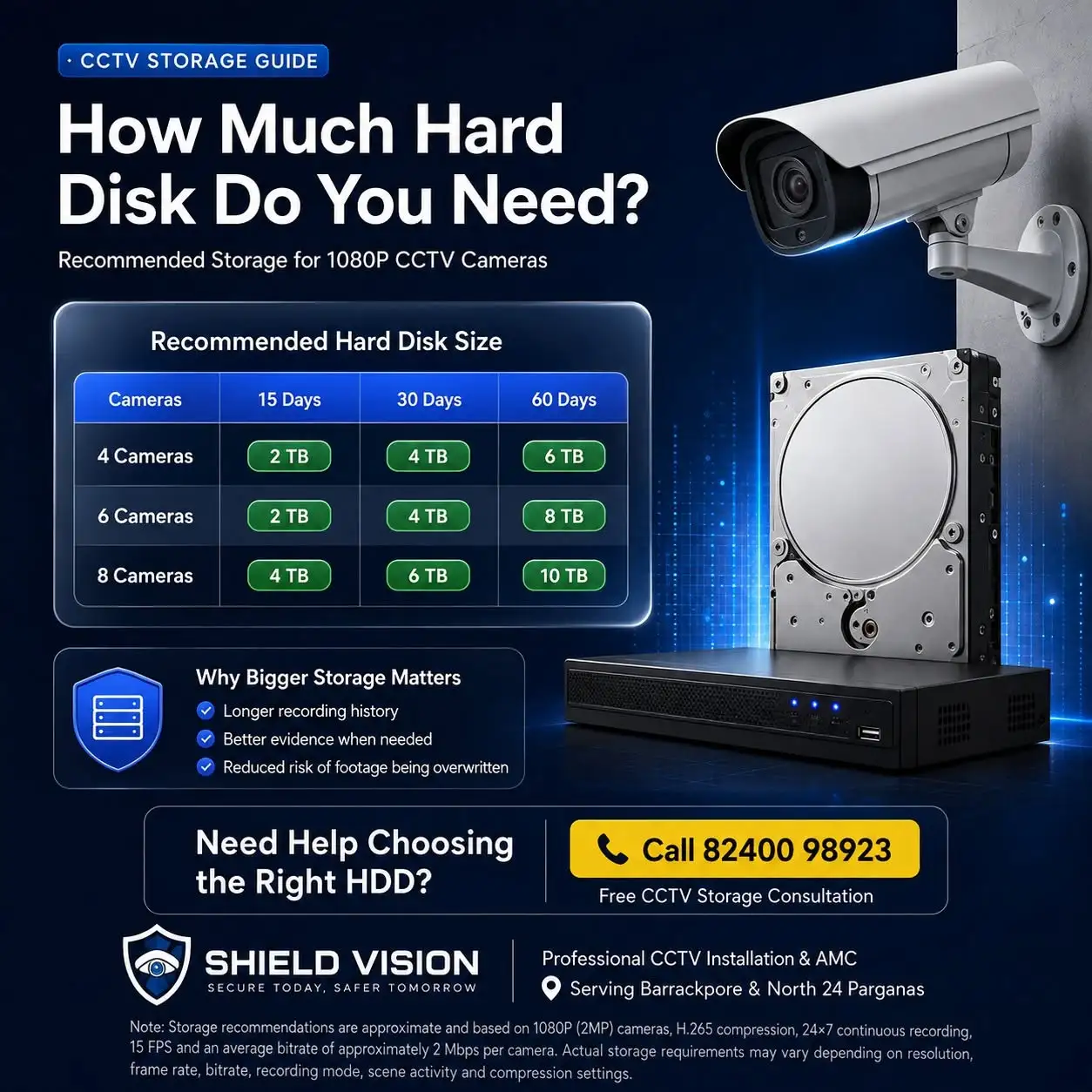
Not sure which hard disk to buy? Here's a quick recommendation based on the most common CCTV setups.
| Number of Cameras | Recommended Hard Disk | Approximate Recording Days* |
|---|---|---|
| 2 | 1–2 TB | 15-30 days |
| 4 | 2–4 TB | 15-30 days |
| 6 | 4 TB | 30 days |
| 8 | 6–8 TB | 30 days |
| 12 | 8–10 TB | 30 days |
| 16 | 10-16 TB | 30 days |
*Actual recording days depend on camera resolution, recording mode, compression technology, frame rate, scene activity, and other factors discussed in this guide.
Never Lose Important CCTV Footage Again
Many people invest in high-quality CCTV cameras but overlook one critical component—the storage capacity. Choosing the wrong hard disk can mean losing valuable footage long before you need it, making your security system far less effective. The good news is that it's completely avoidable. With the right CCTV Storage Calculator and a basic understanding of CCTV camera storage capacity, you can accurately estimate how much hard disk space your system requires. Whether you're installing an Analog DVR or an IP-based NVR, a proper CCTV hard disk calculation helps you select the right storage size for 7, 15, or 30 days of continuous recording without overspending on unnecessary capacity. In this comprehensive guide, you'll learn how to calculate your CCTV storage requirements, understand what affects recording duration, compare Analog and IP camera storage, and use easy-to-follow storage charts to determine the ideal hard disk for your home, shop, office, or business. By the end of this guide, you'll know exactly how to choose the right storage solution and how many days of CCTV footage your hard disk can retain with confidence.
Why This Guide Is Different
Most online CCTV storage calculators ask you to enter technical details such as Bitrate, Frame Rate, GOP, Compression Ratio, Encoding Profile For most people, these terms don't mean much. If you're a homeowner, shop owner, office manager, or small business owner, you don't want to become a CCTV engineer—you simply want to know:
This guide answers all those questions in simple, practical language. No complicated formulas. No confusing jargon. Just clear advice you can use to make the right buying decision.
Why CCTV Storage Matters
When people buy a CCTV system, they often focus on camera resolution, night vision, mobile viewing, or brand. The hard disk usually becomes an afterthought. However, the hard disk is where your security footage actually lives. Without enough storage, even the best CCTV cameras can't help when you need to review an incident. Think of it this way:
A CCTV camera captures events, but the hard disk preserves the evidence.
Choosing the right storage capacity ensures that your recordings remain available for days or even weeks instead of being overwritten too soon. If your hard disk only stores seven days of recordings and the incident happened two weeks ago, the footage may already be gone. That's why storage capacity is just as important as camera quality.
The "Hard Disk Full" Myth
Many first-time users worry that once the hard disk is full, the CCTV system will stop recording altogether. In most modern DVRs and NVRs, that's not how it works. Instead, the system automatically overwrites the oldest recordings with new ones. This process is called loop recording. Click here to know why CCTV Recording Stops?
Common Mistake by the Home and Business CCTV Onwers
Many users assume that a "30-day recording" setting guarantees 30 days of footage. If your storage is too small, recordings may be overwritten much sooner than expected. For many businesses, retaining footage for 30 days or more is considered good practice. Some industries may choose even longer retention periods depending on operational or regulatory needs. If your footage has already been overwritten, recovering it is usually impossible. Choosing the correct storage from the beginning helps ensure that important evidence is still available when you need it. Want to have a complete CCTV Installation in Home or Shop ? Call us at 82400-98923 or fill our online form and we'll get back to you quickly.
Does a Bigger Hard Disk Affect Camera Performance?
This is another common misconception. A larger hard disk does not make your CCTV cameras record in higher quality. It simply allows the system to retain recordings for a longer period before older footage is overwritten.
Quick Tip you can't miss
If your budget allows, choose a surveillance-grade hard disk that's one size larger than your current requirement. This provides room for future camera additions and helps maintain longer recording retention. Replace your Hard Disk, Call 82400-98923 or fill our online form and we'll get back to you quickly.
Analog vs. IP Camera Storage — What's the Difference?
One of the most common questions homeowners ask is: "Do IP cameras require more storage than Analog cameras?" The short answer is: Usually, yes—but it depends on the camera resolution and recording settings. Before comparing storage requirements, let's first understand which type of CCTV system you have.
Analog CCTV system : An Analog CCTV system connects cameras directly to a Digital Video Recorder (DVR) using coaxial cables.They are generally more affordable and easier to install. Most modern Analog systems today use 2MP or 5MP cameras, providing clear Full HD or higher-quality video for everyday security needs.
IP (Internet Protocol) cameras : IP (Internet Protocol) cameras connect to a Network Video Recorder (NVR) using network cables or, in some cases, wireless connectivity. IP cameras often support higher resolutions, advanced analytics, and greater scalability than traditional Analog systems.
If you're comparing a 2MP Analog camera with a 2MP IP camera using similar compression settings, the storage difference may be relatively small. However, many IP camera installations use higher resolutions such as 4MP, 5MP, or even 4K. Higher resolution captures more detail—but it also requires more storage. That's why the next step isn't just asking "Analog or IP?" It's understanding the factors that actually determine how much storage your system needs.
What Impacts the Home CCTV Camera Storage Capacity
Many people believe that the number of cameras is the only factor that decides how much hard disk space they need. That's only partly true. Imagine two neighbours, each with four CCTV cameras. One system stores recordings for 35 days, while the other stores only 15 days. Both have the same number of cameras, so why is there such a big difference? The answer lies in several factors that work together to determine how much storage your CCTV system consumes.Let's look at them one by one.
Number of CCTV Cameras
This is the easiest factor to understand. Every camera records video independently. The more cameras your DVR or NVR is recording, the more storage space you'll need. If you plan to add more cameras in the future, it's usually more economical to choose a larger surveillance hard drive now than to replace it later. How Many CCTV Cameras Do You Need for Your Home? To know more 82400-98923 or fill our online form and we'll get back to you quickly.
Buying Tip: If your DVR supports eight cameras but you're installing only four today, consider sizing your storage for six to eight cameras if you expect to expand within the next couple of years.
Camera Resolution
Resolution determines how much detail each camera captures. Higher resolution means clearer images—but also larger video files.
Good to Know: Bigger isn't always better. For many homes and neighbourhood shops, a well-installed 2MP or 4MP CCTV system provides excellent security without dramatically increasing storage requirements.
Recording Days (Retention Period)
One of the first questions you should ask yourself is: How many days do I want to keep my CCTV recordings? This is known as the retention period. Some users only need one week's footage, while others prefer to keep recordings for a month or more. The longer you want to keep your recordings, the larger your hard disk needs to be. A system designed to store 30 days of footage may require roughly twice as much storage as one designed for 15 days, assuming all other settings remain the same.
Continuous Recording vs Motion Recording
This is one of the biggest factors affecting your CCTV storage capacity. With Continuous Recording (24×7) recording, your cameras record every second of the day, whether there is activity or not. In Motion Recording mode, the camera records only when it detects movement. Our Recommendation: For most homes, use continuous recording for the main entrance and motion recording for low-traffic areas. This provides a good balance between security and storage efficiency.
Video Compression (H.264 vs H.265)
If you've ever compared two zipped folders on a computer, you've already seen compression in action. Compression reduces the size of video files while maintaining usable image quality. Modern CCTV systems commonly use two compression standards, they are H.264 and H.265. If your DVR or NVR supports H.265, enabling it is one of the easiest ways to extend your recording retention without buying a larger hard disk.
Did You Know? In many real-world installations, switching from H.264 to H.265 can increase the number of recording days by around 30–50%, depending on the camera model and scene activity.
Day and Night Recording
Many users assume night-time uses less storage because it's dark outside. In reality, that's not always true. Most modern CCTV cameras use infrared (IR) night vision or low-light technology to continue recording throughout the night. If there is constant movement—such as vehicles on a busy road or people walking past your property—your cameras will continue generating footage regardless of the time. The amount of activity, not the time of day, has a greater impact on storage.
Local Storage vs Cloud Backup
Some homeowners use only the hard disk inside their DVR or NVR. Others also back up recordings to a cloud service. Cloud storage doesn't usually reduce the amount of local storage you need—it simply provides an additional copy of important footage. Think of cloud storage as a safety net rather than a replacement for a properly sized surveillance hard drive.
Quick Summary : Before choosing a hard disk, ask yourself these five simple questions:
Once you know these answers, selecting the right storage becomes much easier.
CCTV Hard Disk Calculation Made Simple
You don't need to be an engineer to estimate your CCTV storage requirement. Instead of complicated formulas, think of it this way:
Storage Needed = Number of Cameras × Video Quality × Recording Hours × Number of Days
That's the basic principle behind every CCTV Storage Calculator, DVR Storage Calculator, and NVR Storage Calculator.
Common Mistakes made by the Home and Business Owners
Many homeowners purchase a 2 TB hard disk because it costs less. A few months later, they discover their recordings are being overwritten after 18–22 days instead of lasting the full month they expected. Spending slightly more on a 4 TB surveillance drive during installation is often much cheaper than replacing the drive later.
CCTV Storage Calculator Chart : Analog CCTV Storage Requirement (Continuous Recording)
| Number of Camers | 7 days | 15 days | 30 days | Recomended | |
|---|---|---|---|---|---|
| 2 | ~300 GB | ~630 GB | ~1.25 TB | 2 | |
| 4 | ~630 GB | ~1.25 TB | ~2.25 TB | 4 | |
| 6 | ~950 GB | ~1.9 TB | ~3.8 TB | 4-6 TB | |
| 8 | ~1.25 TB | ~2.25 TB | ~5 TB | 6 TB | |
| 12 | ~1.9 TB | ~3.8 TB | ~7.5 TB | 8 TB | |
| 16 | ~2.5 TB | ~5 TB | ~10 TB | 10-12 TB | |
| 24 | ~3.8 TB | ~7.5 TB | ~10 TB | 10-12 TB | |
| 32 | ~5 TB | ~10 TB | ~20 TB | 20-24 TB |
Did You Know?: Most CCTV systems overwrite the oldest recordings first when the hard disk becomes full. A larger hard disk doesn't improve video quality—it simply lets you keep footage for more days before it is replaced. Confused over CCTV Storage Calculation ? Call us at 82400-98923 or fill our online form and we'll get back to you quickly.
CCTV Storage Calculator Chart : IP Camera Storage Requirement
| Number of Camers | 7 days | 15 days | 30 days | Recomended | |
|---|---|---|---|---|---|
| 2 | ~630 GB | ~1.25 TB | ~2.5 TB | 4 | |
| 4 | ~1.25 TB | ~2.25 TB | ~5 TB | 6-8 TB | |
| 6 | ~1.9 TB | ~3.8 TB | ~7.5 TB | 8 TB | |
| 8 | ~2.5 TB | ~5 TB | ~10 TB | 10-12 TB | |
| 12 | ~3.8 TB | ~7.5 TB | ~15 TB | 16 TB | |
| 16 | ~5 TB | ~10 TB | ~20 TB | 20-24 TB | |
| 24 | ~7.5 TB | ~15 TB | ~30 TB | 32 TB | |
| 32 | ~10 TB | ~20 TB | ~40 TB | RAID/NAS Solution |
Quick Recommendation: If you're choosing between Analog and IP systems, don't base your decision on storage alone. A properly sized hard drive can support either system effectively—the key is matching the storage capacity to your recording requirements.
Confused over CCTV Storage Calculation ? Call us at 82400-98923 or fill our online form and we'll get back to you quickly.
What's Next?
By now, you should have a clear understanding of how CCTV storage works, how much hard disk capacity different camera setups require, and which storage size is best suited for your home or business. However, there are still a few important questions that many CCTV buyers ask before making a final decision.
Frequently Asked Questions regarding CCTV Staorage Calculation
How much CCTV storage do I need?
The amount of CCTV storage you need depends on five key factors like Number of cameras, Camera resolution (2MP, 4MP, 5MP, etc.), Recording mode (Continuous or Motion Detection), Video compression (H.264 or H.265) and Number of days you want to retain recordings. For most homes with 4 CCTV cameras, a 4TB surveillance hard drive is a practical choice for approximately 30 days of continuous recording using H.265 compression.
Is a 1TB hard disk enough for CCTV cameras?
A 1TB hard disk is suitable for small CCTV systems with 2 cameras or where only 7–15 days of recording are required. If you have 4 or more cameras and want to keep footage for 30 days, you'll usually need a 2TB or 4TB surveillance hard drive, depending on your camera resolution and recording settings.
How many days will a 2TB CCTV hard disk record?
For a typical 4-camera 2MP CCTV system using H.265 compression and continuous recording, a 2TB hard disk can usually store around 24 days of footage. The exact recording period may vary depending on scene activity, frame rate, and camera configuration.
Is a 4TB hard disk enough for a 4-camera CCTV system in home or Business?
Yes. In most residential and small business installations, a 4TB surveillance hard drive provides enough storage for approximately 30 days or more of continuous recording with 4 × 2MP cameras using H.265 compression. It also provides extra capacity for future expansion and changes in recording settings.
Does an IP camera require more storage than an Analog camera?
Generally, yes. IP cameras often record at higher resolutions such as 4MP, 5MP, or 4K, producing larger video files than standard 2MP Analog cameras. As a result, IP camera systems typically require larger hard drives for the same recording period.
What is the best hard disk for CCTV cameras?
Always choose a surveillance-grade hard drive designed for 24×7 recording. These drives are built to handle continuous writing, run cooler, and provide greater reliability than standard desktop hard drives.
Can I use a normal desktop hard drive in my DVR or NVR?
Although a desktop hard drive may work initially, it is not recommended for CCTV systems. Desktop drives are designed for everyday computer use, whereas surveillance-grade drives are built specifically for continuous video recording and are better suited for DVRs and NVRs.
Does H.265 really save storage space?
Yes. Compared with H.264, H.265 compression can significantly reduce storage requirements while maintaining excellent image quality.This allows you to store more days of CCTV footage on the same hard disk.
Which is better: Continuous recording or Motion Detection?
Both have their advantages. Continuous Recording: Records every second and is ideal for shops, offices, and high-security areas whereas Motion Detection: Records only when movement is detected, helping increase recording days and reduce storage usage. Many users combine both modes for the best balance between security and storage efficiency.
Can I upgrade my DVR or NVR hard disk later?
Yes. Most DVRs and NVRs allow you to replace the existing hard drive with a larger surveillance-grade HDD. Before upgrading, check your recorder's maximum supported hard disk capacity and ensure the new drive is compatible .
Does 4K CCTV require more storage?
Yes. A 4K (8MP) CCTV camera records significantly more detail than a 2MP or 4MP camera, resulting in larger video files. If you choose 4K cameras, you should also plan for higher-capacity storage.
What happens when the CCTV hard disk becomes full?
Modern DVRs and NVRs use loop recording. When the hard disk reaches its capacity, the recorder automatically overwrites the oldest footage with new recordings.This ensures your CCTV system continues recording without manual intervention.
If you're unsure, use the storage charts in this guide or consult a professional CCTV installer. Choosing a slightly larger surveillance-grade hard drive than your minimum requirement is often the best long-term investment.
Need Help Choosing the Right CCTV Storage?
Choosing the correct hard disk isn't only about buying the largest drive available. It's about matching your storage capacity to your property's security requirements, recording preferences, and future expansion plans. At Shield Vision, we help homeowners, shops, offices, apartments, schools, warehouses, and businesses choose CCTV systems with the right balance of camera quality, recording duration, and storage capacity.Whether you're installing a new CCTV system or upgrading an existing DVR or NVR, we'll recommend a practical solution that fits your security needs and budget—without paying for unnecessary storage.
Areas We Serve
Shield Vision provides CCTV installation services across Kolkata, North 24 Parganas and South 24 Parganas.
- Barrackpore | Titagarh | Khardah | Khardah | Shyamnagar | Belghoria|Sodepur| Agarpara | Panihati | Kalyani | Kalyani | Kanchrapara | Naihati | Barasat | Kamarhati | Halisahar | Kolkata | Dhakuria | Teghoria | Barisha | Hiland Park | Bikramgarh | Jodhpur Park | Alipur etc.
Final Thoughts
A CCTV system is only as valuable as the footage it preserves. No matter how advanced your cameras are, they can't protect your home or business if important recordings are overwritten before you have a chance to review them. By understanding how CCTV storage works, calculating your recording requirements correctly, and choosing the right surveillance-grade hard disk, you can ensure your security system remains reliable when it matters most. Use the storage charts and recommendations in this guide whenever you're planning a new installation or upgrading an existing CCTV system. A little planning today can save you from losing critical evidence tomorrow. Stay protected. Stay prepared. Choose the right storage, and let your CCTV system do the job it was designed to do.
Need a personalised quotation Contact Shield Vision today for a site assessment and receive a customised CCTV installation package with transparent pricing, genuine products, and professional installation.
How Much Hard Disk Do You Need?
Call us for CCTV installation, repair or maintenance support. Same-day service is available in Barrackpore, Titagarh, Khardaha and nearby areas.
📞 Call: 82400-98923